

 LinkedIn
Most agencies can see the AEO gap on all 12 client domains and fix it on two. The difference is not prompt tracking. It is write access: the ability to get a fix live without waiting in a client’s dev queue.
I used to tell clients the audit was the hard part. I was wrong. The audit tells you what to change; deployment decides whether anyone ever sees it. Search Engine Journal names “We Can’t Implement Your Recommendations” as a reason clients fire SEO agencies. If your AEO platform only tracks visibility, you have bought the same problem in a new dashboard.
Why does an AEO retainer stall at week three?
Week one, you sell the retainer. Week two, you run the audit and show the client prompts where competitors get cited and they do not. Week three, you send the fix list to their developer. Then you wait. I have watched that stall do more damage to a retainer than a weak report ever could.
Tracking is read-only; AEO work requires changes to the site. You may need to update titles and meta, add JSON-LD, turn the first 120 words into a direct answer, add FAQ or HowTo blocks, fix canonicals and robots access, or publish a new page. If you cannot make those changes, you can describe the work in a PDF. You cannot deliver it.
The first question to ask a platform is therefore not how many prompts it tracks. Ask how a change reaches the client’s site.
Which path gets a change live: tickets, CMS writes or edge injection?
For an agency choosing a deployment workflow, I look at three paths:
- Tickets: You recommend a change; the client’s developer ships it.
- CMS publishing: You write through an API or plugin so the change lives in the site’s content system.
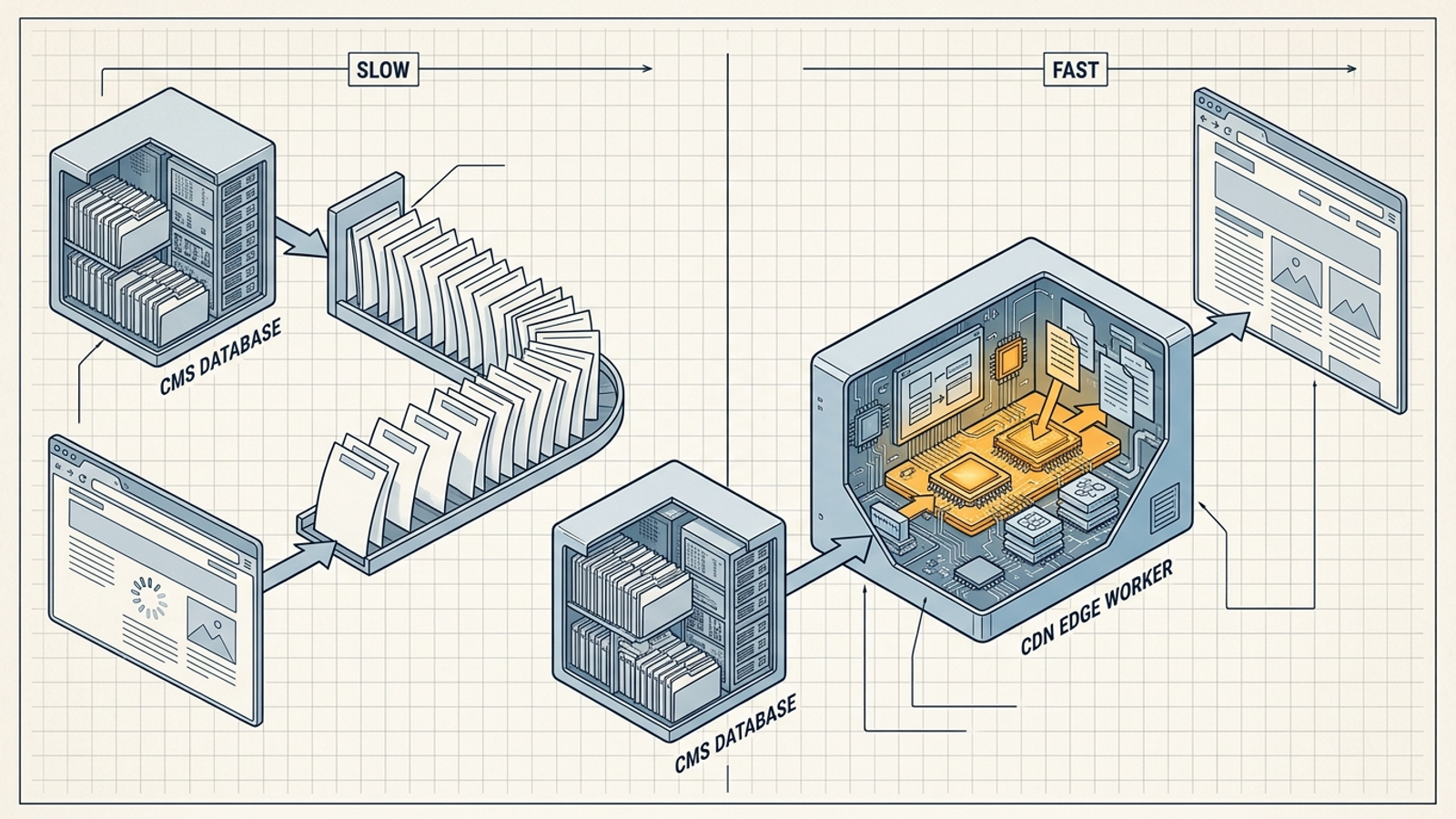
- Edge deployment: You alter the delivered response at the CDN layer, after the origin produces it but before a visitor or crawler receives it.
Tickets cost time. CMS writes cost setup per platform and per client. Edge deployment asks for trust and access upfront, then lets you move without a separate CMS integration for every change. For a 10-plus-domain book, that distinction decides how much of your audit becomes live work.
When should you use a developer ticket?
Say you have $20k/month in retainers across 10 clients and every AEO fix needs a ticket. You send a schema update, an answer rewrite and a new FAQ page to a client whose developer works in two-week sprints. Checkout bugs sit ahead of your request. Two sprints pass; QA flags the JSON-LD; the landing-page owner changes the copy. Six weeks later, nothing is live, and the client asks what they paid for.
That is not a developer problem. It is a deployment-model problem. Keep tickets for changes the client must own, such as pricing logic or checkout code. Skip them as the default route for titles, answers and schema. If a platform leaves all of those in a queue, you bought a prettier audit, not execution.

When does direct CMS publishing make sense?
This is what many AEO tools mean by “automatic publishing.” You connect WordPress, Shopify, Webflow, Wix, Ghost, Squarespace or a custom CMS through an API, plugin or webhook. The platform pushes edits or publishes articles as native content. Auto-publishers in this category list CMS connections and structured-data automation. When a write succeeds, it lives at the origin and persists after you cancel the publishing tool.
The trouble starts when you repeat the setup across clients. Each CMS has its own permissions, roles and field mapping. A headless site or locked-down theme may reject the write you need. Pricing can stack too: one auto-deployer lists a $1 trial followed by $89 a month per website, while Search Atlas OTTO’s Agency tier is listed at up to 10 projects for $999 a month. At 12 domains, check the project limit before promising the same workflow to every client.
Use CMS publishing for durable content when you have the access to make it work. It beats tickets for new pages. Do not make it your only deployment path if half your clients have different, restricted setups.
What does an edge proxy let you ship?
At the edge, the CMS still renders the page. A worker can then change the delivered HTML without an origin deploy. Edge workflows can rewrite titles, meta and canonicals; inject JSON-LD; handle redirects and robots.txt; and roll back changes. Because you control the response after the origin produces it, you can patch many page types without first persuading each CMS to accept a write.
The underlying service may be Cloudflare Workers, Fastly Compute, Akamai EdgeWorkers or Lambda@Edge. Some platforms put a UI in front of that plumbing, so you approve rules rather than write worker code yourself. The advantage for an agency is a repeatable deployment approach across different site stacks. The condition is that the client must approve and grant the right CDN access first.
Edge beats a plugin when the CMS is the bottleneck. It does not make the CMS irrelevant, and it does not turn every client-site change into an appropriate edge rule.
What can you change at the edge, and what should stay in the CMS?
Start with schema. A ticket can eventually ship it; a CMS integration can write it into the origin. An edge worker can inject JSON-LD into the delivered page without an origin deploy. That makes edge useful when you need to update facts across many URLs and cannot wait for separate releases.
Persistence is the catch. An overlay that stops running when you disconnect is not the same as a native CMS write that remains after the tool is cancelled. Use edge to get an approved fix live; move changes you intend to keep into the CMS when you can. I cover that division in Agency AEO: Managing Knowledge Graphs and Auto-Publishing to Client CMS.
Answer passages and technical fixes follow a similar pattern. Direct answers, headings, internal links, canonicals, robots access and hreflang can be altered in delivered HTML. OTTO-style deployers list titles, headings, schema, internal links, redirects, canonicals and alt text among the changes they automate. But an edge rewrite may be invisible inside the CMS. Overlapping origin and worker rules can produce duplicate canonicals, redirect chains or the wrong robots directives.
Log every edge change and keep one source of truth. Otherwise, you will spend the time you saved on deployment debugging a page nobody remembers changing.
Where should net-new pages live?
You can serve a new page from the edge. I would not build a client’s lasting content library there. If the proxy is paused or disconnected, a page that never existed at the origin can disappear with it. Edge is an overlay; the CMS is the record. Use edge to test or patch what cannot wait, then publish the pages you intend to keep through the client’s CMS.
That distinction shapes how I use groas for agency work. On the agency side, groas runs content, technical fixes and citation work around the clock, with actions logged with their reasoning and weekly reports under my brand. The execution and the record matter to me: I need to see what shipped, not just what a dashboard recommends. I still check the deployment path for each client site. If a platform cannot get a change live, it is reporting. If it ships and logs the work, it can serve as fulfillment.
How do you set up an edge path without a developer on staff?
You do not need to write a worker yourself if your platform provides a UI. You do need the client’s permission to route and change site responses, plus a rollback plan. I handle the conversation in this order:
- Confirm the site’s CDN and who controls it. Work out whether the domain already runs through a service such as Cloudflare, Fastly, Akamai or CloudFront, and who can grant delegated access. Do not promise developer-free onboarding before you know who owns that decision.
- Agree on the scope. Explain that edge rules change the delivered response, not the origin code, theme or CMS content. Name the first URLs and change types you propose to touch. I walk through this conversation in Onboard a White-Label AEO Client in an Afternoon Without Touching Their CMS.
- Set approval, logging and rollback before publishing. Record what changed, on which URL and why. Make sure each rule can be disabled promptly. When the client’s SEO asks why the canonical changed on /pricing, you need a timestamp and a way back, not an argument.
Skip an edge tool that can inject changes but cannot show or undo them. Speed without accountability is just a faster way to create a client escalation.
Where does CMS publishing break across client sites?
WordPress is easy until it is not. API access may get you posts and fields quickly; then you meet a page builder, conflicting SEO plugins and a security policy that blocks the credentials you expected to use. Webflow can be clean for pages and CMS items, but bulk publishing can run into rate limits. Shopify may constrain the edits you want outside products and blog posts. In a headless setup, content and rendering may live in separate systems, and the agency may not have access to both.
The pattern matters more than the platform names: every CMS adds another write path to maintain. “Automated publishing” can become several custom integrations and a spreadsheet of logins. That is why I start by asking whether a client can support an edge path, then add CMS writes for content that needs to persist. It is not a rule to force on a client with stricter change control. It is a way to avoid making their CMS queue the only route to delivery.
Reviewers of auto-deploy tools advise approval mode and a low-risk-first rollout on one test project. I would start with schema and titles, check pages before widening scope, and leave redirects for a human review. If a vendor says it “works on any CMS via pixel,” ask what remains after you cancel. If the answer is nothing, treat it as an overlay, not permanent publishing.
Which deployment path fits each client?
I use a short fit-call triage rather than one rule for the whole book:
- Locked CMS or no admin access: Check whether the client will approve delegated CDN access. If so, consider edge first for suitable fixes.
- Standard CMS with agency admin access: Publish lasting pages and keeper edits in the CMS. Use edge when an approved schema or answer change needs to move faster.
- Regulated or enterprise change control: Keep required tickets as the record. Do not switch on edge changes until the relevant owners approve them.
Choose per domain, not per sales deck. The path you can actually get approved is better than the one your platform demonstrates beautifully on its own test site.
How do you roll out a 10-domain book?
Do not turn on 10 domains at once. Start with two friendly ones and make the workflow prove itself:
- Week one: Put edge changes in approval mode. Start with schema and titles, and verify the delivered pages.
- Week two: Move to answer passages on the top five cited pages per domain. Check what visitors and crawlers receive before widening the rollout.
- Week three: Move the changes you want to keep into the CMS where access permits. Then take the tested pattern to the next three domains.
Before signing a platform for the full book, use The Agency AEO Checklist: 22 Checks Before You Sign Up 10 Client Domains. Confirm live publishing, the actual onboarding permissions and per-domain pricing in writing. A demonstration on one domain tells you little about what happens on domain 11.
What should you demand from an AEO platform?
Prompt visibility is useful only if you can act on it. Get these three answers in writing before you commit a client book:
- An action log you can forward: What changed, on which URL, why it changed and how to undo it?
- Approvals and rollback: Which changes wait for review, and can you disable a rule without an origin deploy?
- Pricing beyond the first plan limit: What happens when the next client domain pushes you past the included projects?
Skip a visibility-only product if you are buying it to fulfill an AEO retainer. That is the PDF business again.
Pick one stalled domain today. Find out who controls its CDN and ask whether they will approve delegated access. Then choose a small, reviewable schema or answer change, get it live through the path the client permits, and plan where the keeper version will live. One shipped fix does more for that retainer than tracking 20 more prompts.